
How to Get Support from Helpdesk for Sticky Header Effects for Elementor?
Running into an issue with Sticky Header Effects for Elementor? Before reaching out, a few quick checks often resolve the most common problems. If the issue still persists, you can submit a helpdesk ticket and our team will be happy to help.
To check the complete feature overview documentation of Sticky Header Effects for the Elementor plugin, click here.
Before You Contact Support
Most issues can be solved in a couple of minutes. Please try these first –
1. Read our Product Documentation and watch our YouTube channel tutorials.
2. Make sure you’re using the latest stable version of both the Free and Pro plugins.
3. Test for a plugin conflict – deactivate all other plugins, then reactivate them one by one to find the one causing the issue.
4. Clear your performance cache, then do a hard refresh (CTRL/CMD + SHIFT + R).
5. Purge or temporarily deactivate your caching plugin.
6. Switch to a default WordPress theme temporarily to rule out a theme conflict.
7. (Advanced) Enable WP_DEBUG in wp-config.php to surface any error messages.
8. Search existing support tickets for a similar issue before opening a new one.
Submit a Helpdesk Ticket
Pro users get priority support through the POSIMYTH Store Helpdesk.
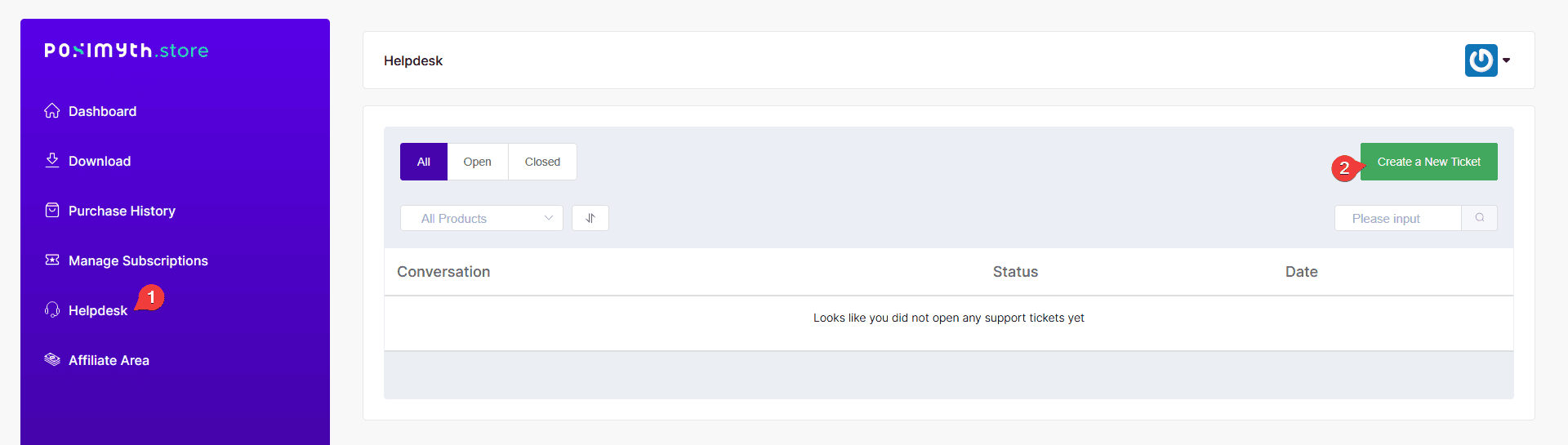
1. Log in to your POSIMYTH Store account.
2. Go to the Helpdesk.
3. Click Create a New Ticket.
Information to Include
To help us resolve your issue as fast as possible, please share –
- The live site URL where the issue can be seen.
- WordPress login credentials (or a temporary login link). You can share these securely with [email protected].
- A screenshot of any console errors (F12 > Console tab).
- A screenshot of your System Info (Elementor > System Info).
- Your device and browser details (operating system, browser version, screen resolution).
- A clear description of the issue, with the steps to reproduce it.
- Screenshots or a screen recording (the POSIMYTH Record tool makes this easy).
What Support Covers
- Included: feature questions, bug fixes, and compatibility updates for WordPress, PHP, and Elementor.
- Not included: custom coding, third-party plugin compatibility, hosting or server issues, and custom design work.
Resources
- Helpdesk – store.posimyth.com/helpdesk
- Support Policy – store.posimyth.com/support-policy

Still stuck?
Ask in the community — real answers from the team and other builders.