
How to Install and Activate Sticky Header Effects for Elementor?
This guide provides step-by-step instructions on how to install and activate the Sticky Header Effects for Elementor plugin.
To install the Sticky Header Effects for Elementor plugin, follow the steps.
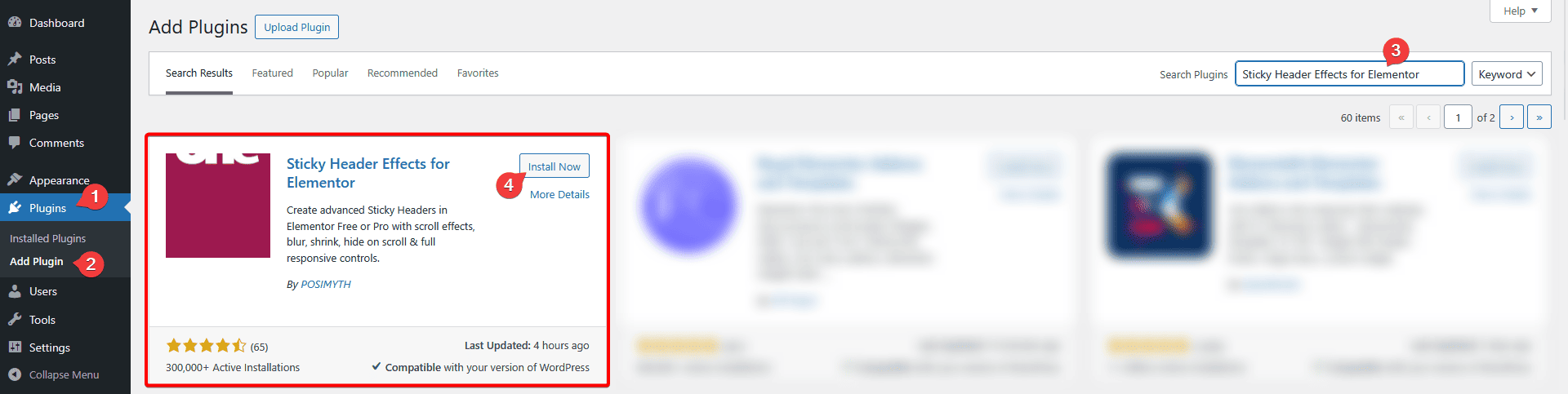
1. From the WordPress Dashboard, go to Plugins > Add New Plugin.
2. In the search field, search for “Sticky Header Effects for Elementor”; you’ll find the Sticky Header Effects for Elementor plugin.
3. Click on Install Now and then Activate.
Note: Make sure you have the Elementor free version installed to make it work.
Now you can create amazing-looking sticky header effects for your Elementor website.

Still stuck?
Ask in the community — real answers from the team and other builders.