
How to Open Elementor Submenu Dropdown on Hover (Quick Setup)
Are you frustrated that your Elementor submenu only opens on click, making navigation clunky for your visitors? This limitation can hurt your site’s user experience and drive people away.
If click feels more reliable for your visitors than hover, see how to open the same submenu on click instead.
But don’t worry. You don’t need to know advanced coding!
In this blog, you’ll discover a simple, free method to make your Elementor submenu dropdown open smoothly on hover, instantly improving your website’s navigation.
Why Open Submenus on Hover?
When your submenu opens on hover, visitors can easily see all your navigation options without extra clicks.
This makes your site more intuitive and keeps users engaged.
What You Need
To get started, make sure you have:
- WordPress installed
- The Plus Addons for Elementor plugin activated
- A navigation menu created in WordPress
Tip: If you haven’t created a header template yet, you can use the free Nexter Builder or Elementor Pro.
How to Open Elementor Submenu Dropdown on Hover [Step-by-Step]
1. Add the Navigation Menu Lite Widget
First, add the Navigation Menu Lite widget from The Plus Addons to your header template. This widget is free and packed with features.
2. Configure the Menu Settings
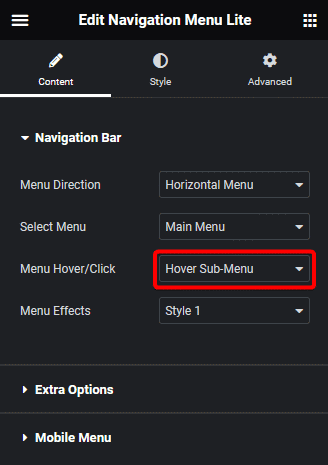
- Menu Direction:
In the widget settings, choose your preferred menu direction from the Menu Direction dropdown.
- Menu Type:
Select your WordPress menu from the Menu Type dropdown.
- Menu Hover/Click:
Next, open the Menu Hover/Click dropdown and choose Hover Sub-Menu. This setting ensures your submenu appears when users hover over the parent menu item.
3. Customize Dropdown Effects (Optional)
You can further enhance your menu by selecting a style from the Menu Effects dropdown. This adds smooth animations and visual flair to your submenu.
That’s It-You’re Done!
Now, your Elementor submenu will open on hover, providing smooth navigation for your visitors, for free!
Bonus Tip
If you ever want to switch back to opening submenus on click, simply revisit the Menu Hover/Click setting and choose the click option.
Want the sticky header without the code?
Sticky Header Effects for Elementor drops in as a widget. Free plugin, no account needed.
