
What “Zero CSS, Zero Code” Actually Means When You Build a Header in Elementor
“The Fastest Way to Build Sticky Headers in Elementor. Without CSS or Code.” That is the headline on the Sticky Header Effects for Elementor homepage right now, backed up a few lines down by a second, blunter badge: “Zero CSS, Zero Code.” Two phrases that sound like marketing shorthand until you check exactly what they exclude, and what they do not.
For the full breakdown of what this plugin adds versus what Elementor itself already does, see what the plugin actually does.
A zero code elementor header is achievable for scroll effects specifically; the header’s own layout is still built the normal Elementor way. The underlying mechanics are standard CSS position behavior, not proprietary code.
This post checks that claim against the actual product, effect by effect, rather than repeating it. What genuinely requires no code, where a builder’s own instinct to “just add some CSS” would normally kick in, and where the phrase has an honest edge, are three different questions worth answering separately.
Key Takeaways
- “Zero CSS, Zero Code” describes how all 21 scroll effects are configured: entirely from the Elementor Advanced tab, no custom CSS or JavaScript snippet required.
- Every effect is set through Elementor’s own visual controls (toggles, sliders, color pickers, dropdowns), the same interface pattern as any other Elementor widget setting.
- The claim covers configuring the plugin’s own effects, not the header layout itself; building the header’s actual design still happens in Elementor as normal, with or without this plugin active.
- Under the hood, the plugin’s own CSS and JavaScript run to produce each effect; “zero code” describes what the builder writes, not what the browser executes.
- This matches Elementor’s own broader pitch (a visual page builder that replaces hand-written markup for most tasks) rather than being a claim unique to this one plugin.
What “Without CSS or Code” Is Actually Promising
Before this kind of plugin existed, a shrink-on-scroll header, a background color change after a set scroll distance, or a hide-on-scroll-down header meant writing a scroll event listener in JavaScript, toggling a CSS class, and hand-tuning transition timing. That is real, ongoing front-end code, not a one-time setup step, since it needs testing across browsers and revisiting whenever the header’s markup changes.
The claim is that this specific category of work, the scroll-effect layer, is replaced entirely by visual controls. Not “less code.” Not “a starter snippet you customize.” The builder never opens a code editor for any of the 21 effects, free or Pro.

Checking the Claim Against the Advanced Tab
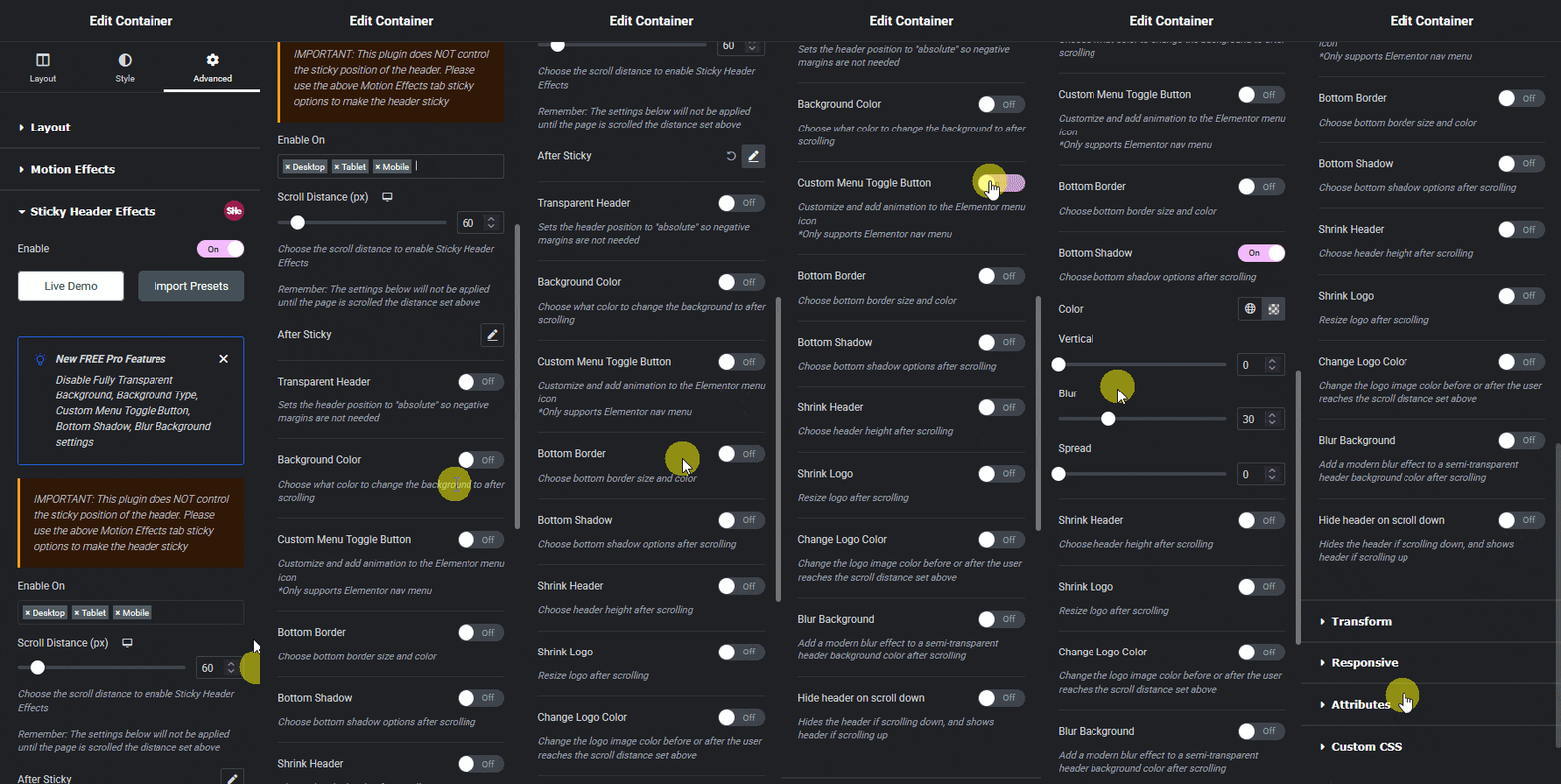
Every one of the 10 free effects (Header Scroll Distance, Transparent Header Background, Dynamic Background Color Change, Bottom Border Styling, Header Shrinking, Logo Shrinking, Logo Color Change, Blur Background, Hide Header on Scroll Down, and Above Header Section) is a toggle plus a small set of visual controls: a color picker for a color change, a slider for a scroll distance, a dropdown for a direction. None of them present a code field.
The 11 Pro effects follow the identical pattern: Display Conditions, Sticky Until, Reveal and Entrance Animations, Header Replace on Scroll, Logo Image Swap, Sticky Menu Styling, Extended Backdrop Filters, Background Image on Sticky, Header Opacity Transition, Logo Styling on Sticky, and Multi-Sticky Coordination are each configured the same visual way, not through a code panel of any kind. On this specific claim, the plugin holds up to direct inspection.
What “Zero Code” Does Not Mean
“Zero code” describes the builder’s own workflow, not the absence of code entirely. The plugin ships its own CSS and JavaScript, loaded once per page as “one light script,” per the product’s own description, and that script is what actually executes each effect in the browser. A builder configuring a shrink effect is not writing that script; they are also not somehow avoiding code running on their site altogether, which is a different and less accurate claim the homepage does not actually make.
The claim also does not extend to the header’s layout itself. Positioning the logo, choosing a menu style, setting column widths, all of that is still ordinary Elementor page-building work, done the same way with or without this plugin active. What the plugin removes is specifically the scroll-behavior layer on top of a header you have already built.
Where This Fits Elementor’s Own Pitch
Elementor itself is built on the same premise at a larger scale: a visual page builder that replaces hand-written HTML and CSS for most page-building tasks, while still generating real HTML and CSS underneath every widget a builder drags onto the canvas. Sticky Header Effects for Elementor applies the identical logic to one specific, previously code-only category (scroll-triggered header behavior) rather than inventing a new one.
Seen this way, “Zero CSS, Zero Code” is a scoped, checkable claim about one plugin’s configuration surface, consistent with how Elementor itself is marketed, not an unusual or inflated promise standing apart from the rest of the ecosystem it plugs into.
Comparing to the Hand-Coded Alternative
Picture the same shrink-on-scroll header built by hand instead. A developer writes a scroll event listener, decides on a debounce or throttle interval so the listener does not fire on every single pixel of scroll, toggles a CSS class past a chosen scroll distance, and writes the transition timing for the shrink itself. Then it needs testing on an actual phone, since touch scroll behavior differs from a mouse wheel in ways that surface bugs a desktop-only test misses.
None of that is unusually hard for a working developer, but it is real time spent per project, and it is code someone has to remember exists the next time the header’s markup changes for an unrelated reason. The zero-code claim is specifically that this entire sequence collapses into toggling a setting and choosing a scroll distance from a slider, for a fixed set of 21 named effects rather than an open-ended custom one.
Honest Limits
A builder who wants a scroll effect outside the 21 named ones, a very specific animation timing curve not exposed as a control, for example, will still need custom code, since a fixed set of visual controls cannot cover every possible effect a developer could hand-write. The plugin’s own scope is stated plainly on the effect grid; anything outside that grid is outside “zero code” by definition, not a broken promise.
Frequently Asked Questions
Does “zero code” mean the plugin adds nothing to my site’s source? No. It means the person configuring effects never writes CSS or JavaScript. The plugin’s own stylesheet and script still load and run, described by the product itself as “one light script.”
Can I still add custom CSS on top of this plugin if I want to? Yes. Nothing about the plugin’s visual controls prevents adding your own CSS elsewhere in Elementor for anything outside the 21 named effects.
Does this claim apply to building the header layout itself? No. Layout (logo position, menu style, spacing) is ordinary Elementor page-building work. The zero-code claim covers configuring scroll effects on a header you have already built.
The homepage headline and “Zero CSS, Zero Code” badge were checked live on stickyheadereffects.com this month; the full effect grid referenced above is on the same page under 21 Sticky Header Effects, with setup detail for each in the documentation. For the broader context of visual, code-free web building this plugin’s approach sits inside, Elementor’s own features overview describes the same no-code philosophy at the page-builder level.
Want the sticky header without the code?
Sticky Header Effects for Elementor drops in as a widget. Free plugin, no account needed.
