
Elementor Dropdown Submenu Behind Content: An Updated Fix for 2026
The site’s own 2025 guide on a dropdown submenu hiding behind content covers three real causes: a z-index conflict, an overflow setting clipping the dropdown, and a theme conflict worked around with a dedicated mega-menu widget. Those three fixes are still correct and still worth trying first. This post covers a fourth cause that guide does not mention at all, because it is specific to a header that is itself sticky and uses a CSS transform to get there, which describes a growing share of Elementor headers in 2026.
An elementor dropdown submenu behind content problem like this one is almost always a z-index or overflow conflict, not a bug in the menu widget itself.
Key Takeaways
- A CSS transform on a header creates a new stacking context for everything inside it, per the CSS specification. This is the mechanism behind a dropdown that stays hidden even after you raise its z-index.
- Increasing z-index only works if the dropdown and the content covering it share the same stacking context. A transform on the header’s own container breaks that assumption.
- Most sticky header plugins, this one included, apply scroll effects through transform and opacity specifically for performance reasons, which means this stacking-context conflict is more common on transform-based sticky headers than on older, non-transformed fixed headers.
- The fix is moving the z-index and stacking context to the right level, not raising the number further. A dropdown stuck at z-index 999 inside a transformed parent will not out-rank a sibling element outside that parent no matter how high the number goes.
- This is a CSS mechanism, not a plugin setting. No toggle in Sticky Header Effects for Elementor turns transform-created stacking contexts on or off; understanding the mechanism is the actual fix.
What the Original Fixes Still Cover
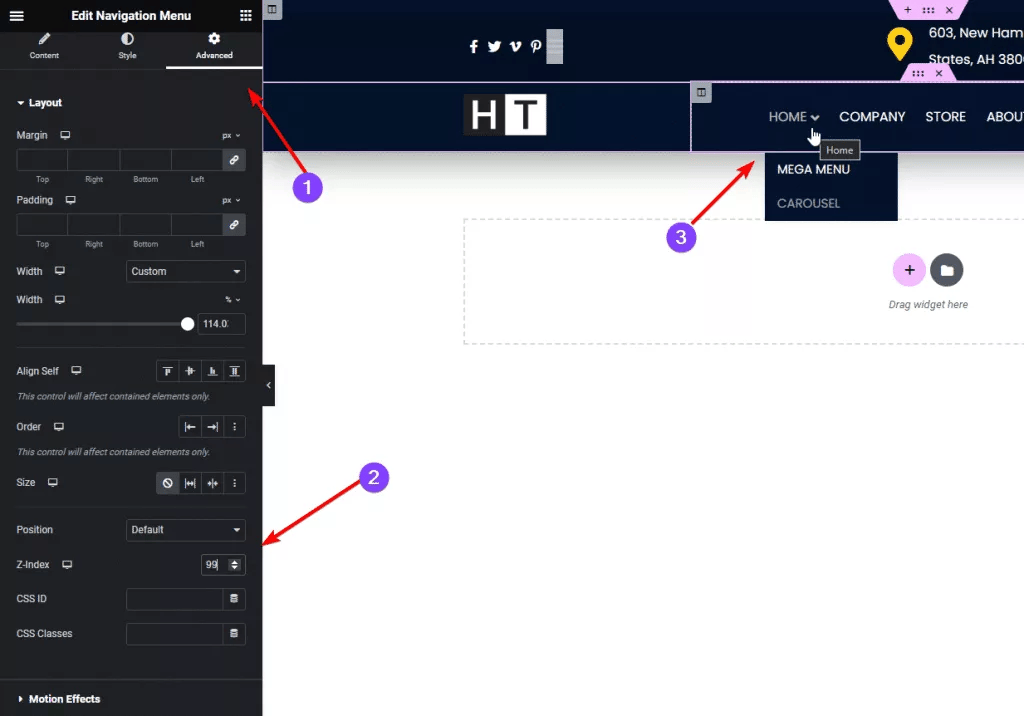
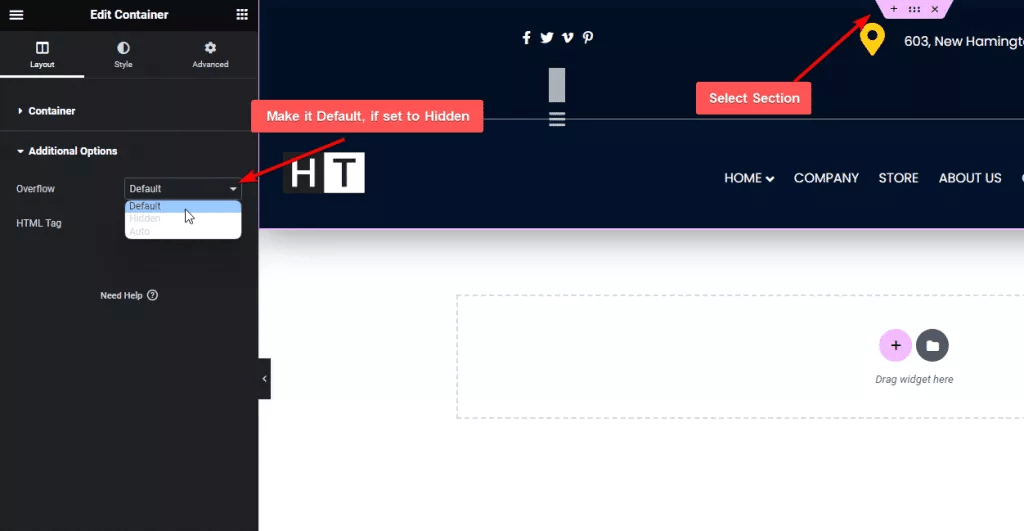
The site’s existing 2025 guide to this problem walks through three fixes that remain correct: raising the dropdown’s z-index in the Advanced tab, changing a parent container’s Overflow setting from Hidden to Visible or Default, and switching to a dedicated mega-menu widget when a theme conflict is the actual cause. Try those three first, in that order, since they cover the majority of cases and take a few minutes each.
If none of those three fixes resolves it, and specifically if your header is sticky and running any scroll effect that changes its appearance, the cause below is worth checking next.
The 2026 Addition: When the Header Itself Creates a New Stacking Context
Per the CSS specification, an element with a transform value other than none creates a new stacking context for itself and everything positioned inside it. A sticky header that shrinks, changes background, or animates on scroll using CSS transform, which is exactly how Sticky Header Effects for Elementor and most modern sticky-header implementations work for performance reasons, becomes a new stacking context the moment that transform is applied.
Once that happens, a dropdown submenu positioned inside the header can only stack against other elements inside that same transformed context. Its z-index no longer compares directly against elements outside the header, including page content below it, regardless of how large the z-index number is set to.
Why “Just Increase the Z-Index” Stops Working Here
Raising a z-index value from 99 to 999 to 9999 is a common troubleshooting instinct, and it is exactly the 2025 guide’s own first fix. That instinct assumes every element on the page competes in one shared stacking order. A transform breaks that assumption for anything inside the transformed element, which is why a dropdown stuck behind content can keep failing at every z-index value tried, right up to the maximum a browser will render.
This is also why the problem can appear intermittently: it often only shows up once the header has actually gone sticky and its transform-based effect has triggered, not on initial page load before any scrolling. A dropdown tested only at the top of the page, before the sticky transform activates, can look completely fine and then fail once the visitor scrolls.
The Actual Fix: Address the Stacking Context, Not Just the Number
Three approaches work, in order of how invasive they are. First, confirm whether the dropdown genuinely needs to escape the header’s stacking context at all; many designs can accept the dropdown staying within it if nothing else on the page needs to render above the header in the first place.
Second, if the dropdown must visually cover page content that sits in a different stacking context, moving the dropdown’s actual DOM position outside the transformed container, rather than relying on z-index alone, resolves it directly, since position and z-index only resolve conflicts within a shared context.
Third, if changing DOM structure is not practical inside Elementor’s own widget output, reconsider whether the specific scroll effect needs to run continuously or only needs to apply once past a scroll threshold; a header that finishes its transform and does not continuously reapply it can behave more predictably for dropdown stacking than one recalculating the transform on every scroll frame.
Testing After Any Fix
Test the dropdown specifically after the header has gone sticky, not only at the top of the page, since that is the exact state where a transform-created stacking context takes effect. Test on the actual front end rather than only the Elementor editor canvas, since editor iframes do not always reproduce scroll-triggered transforms identically to the rendered page.
Honest Limits
Sticky Header Effects for Elementor does not have a setting labeled “fix stacking context” or a toggle that disables transform-based effects for this purpose alone, because stacking context is a CSS-level mechanism, not a plugin feature. Turning off every scroll effect on the header removes the transform and the conflict along with it, but that also removes the effects the plugin is built to provide, so it is a diagnostic step, not a real solution for a header that needs its scroll effects.
Frequently Asked Questions
Does this only affect Sticky Header Effects for Elementor? No. Any sticky header using CSS transform for its scroll effects, from any plugin or custom code, creates the same stacking context. This is a browser CSS behavior, not specific to one plugin.
Does disabling all scroll effects fix the dropdown permanently? It removes the transform causing the new stacking context, so yes, but it also removes the sticky scroll effects themselves, which is rarely the actual goal.
Should I try the 2025 fixes first? Yes. Z-index, overflow, and a dedicated mega-menu widget resolve most cases and take less time to test than restructuring anything. Move to the stacking-context explanation above only once those three are confirmed not to be the cause.
MDN’s stacking context reference is the primary technical source for how a transform creates a new context, and its position reference covers sticky positioning itself. The CSS Transforms specification is the formal source for the stacking-context rule cited above. For the base sticky setup this issue depends on, see the complete sticky header setup guide, and the troubleshooting guide for other common issues.
Want the sticky header without the code?
Sticky Header Effects for Elementor drops in as a widget. Free plugin, no account needed.
