
Elementor Header Builder: What It Means and When You Need One
“Header builder” gets used for at least three different things in Elementor discussions, and mixing them up is the fastest way to buy the wrong plugin or spend an hour looking for a setting that lives somewhere else entirely. This post separates what each one actually does, when you need a dedicated header builder at all, and where scroll effects like sticky behavior fit once the header itself exists.
For the header layout side specifically, the setup guide covers making it sticky, and the plugin’s own scope covers exactly where that tool starts and stops.
An elementor header builder, in Elementor’s own terminology, is really just the Theme Builder half of the job; the scroll-behavior half is a separate tool entirely.
Key Takeaways
- “Header builder” in Elementor usually means one of three things: Elementor Pro’s Theme Builder, the free Nexter Extension Theme Builder for Elementor Free, or simply building a header section directly on a page.
- You only need a dedicated header builder if the same header must appear across multiple pages automatically. A single landing page does not need one.
- None of the three options make a header sticky or add scroll effects on their own. That is a separate layer, added from the section’s Advanced tab.
- Sticky Header Effects for Elementor works on top of any of the three header-building methods, on Elementor Free or Pro, and adds 10 free scroll effects plus 11 more in Pro.
- 300,000+ sites currently run the plugin, version 2.2.2, requiring WordPress 6.3+ and PHP 7.4+.
What a Header Builder Actually Builds
A header builder’s job is layout and reuse: it lets you design a header once, in Elementor, and have that exact design appear on every page it is assigned to, without copying sections manually. That is the entire job. Whether the header scrolls, sticks, or changes on scroll is a separate concern handled elsewhere.
The confusion starts because Elementor offers this reuse mechanism through more than one path, depending on whether you run Elementor Free or Pro, and a plugin name containing “header” does not always mean it builds headers at all; some only add effects to a header you build yourself.
The Three Ways to Get a Reusable Header in Elementor
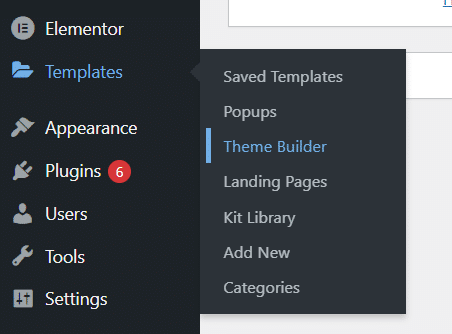
1. Elementor Pro’s Theme Builder. This is the native, paid option. Under Templates, Theme Builder, you create a Header template, design it in the regular Elementor editor, and set display conditions for where it should appear (typically “Entire Site”). Elementor’s own documentation on the Header Site Part and on creating a header template with a container covers the exact steps.
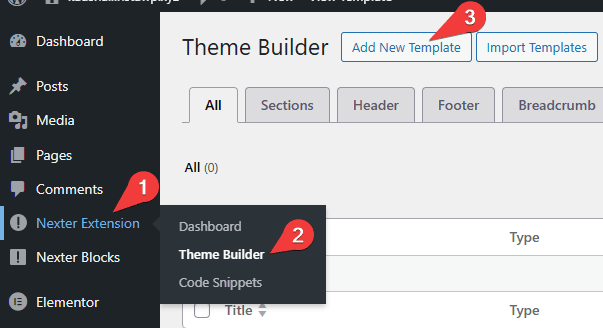
2. A free Theme Builder add-on, for Elementor Free. Elementor Free has no Theme Builder of its own. Free plugins such as Nexter Extension add one, giving Elementor Free users the same “design once, apply site-wide” workflow Pro users get natively, without requiring Elementor Pro itself.
3. A header section built directly on a page. For a single page, or a site with only one template, a full Theme Builder is overhead you do not need. Add a section or container at the top of the page, design it as a header, and skip the reuse mechanism entirely.
When You Actually Need One
Use a Theme Builder (option 1 or 2) when the header must stay identical across many pages and you want a single place to update it. Skip it for a one-page site, a landing page with a unique header, or a small build where copying one section is genuinely faster than setting up display conditions.
Agencies building on Elementor Free for budget-conscious clients lean on option 2 most often: a free Theme Builder plus a free sticky-effects layer covers most header requirements without a single paid add-on.
What None of These Three Give You: Scroll Behavior
Building the header and making it react to scrolling are two different systems in Elementor. A Theme Builder template, a free-plugin template, and a hand-built page section all produce a static header by default: it sits at the top of the page and scrolls away with everything else.
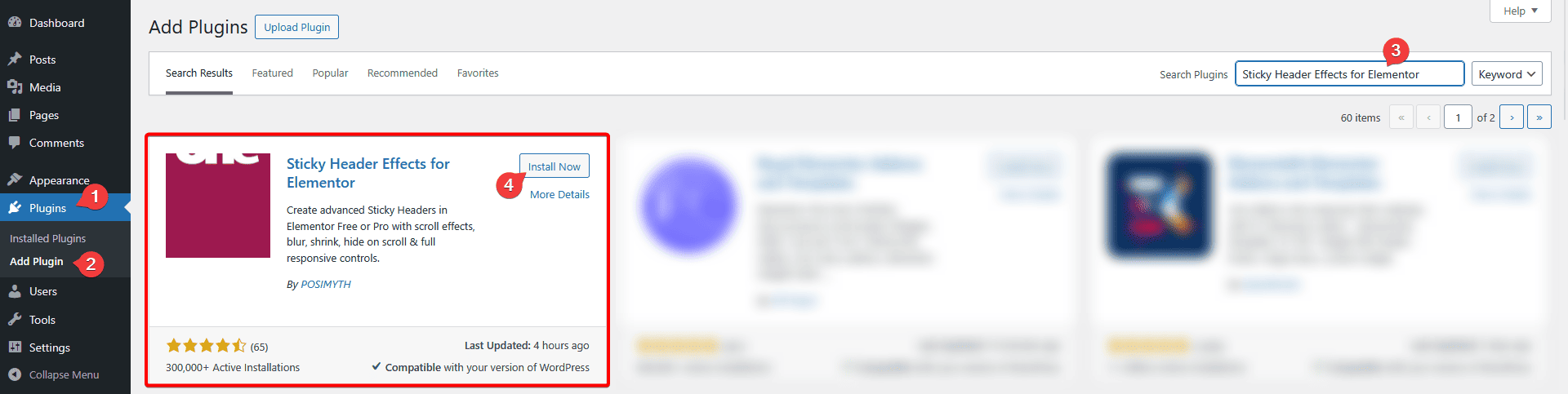
Elementor Pro has its own basic sticky toggle under a section’s Motion Effects, but Elementor Free has none. Sticky Header Effects for Elementor adds sticky positioning plus 21 scroll effects (10 free, 11 Pro) on top of whichever of the three header methods above you used to build it, from the same Advanced tab, on Elementor Free or Pro.
Honest Limits
Sticky Header Effects for Elementor does not build the header layout itself, and it is not a Theme Builder. It attaches to a header section or container that already exists, built by one of the three methods above. If you have not built a header yet, build that first.
It also does not build mega menus or a general page/footer builder. A dropdown mega menu is a function of the menu widget itself (Elementor’s own Menu widget or a dedicated mega menu builder), not of the sticky-effects layer. Elementor’s own guide to creating a mega menu covers that separately.
Header Builder vs Your Theme’s Customizer
Many WordPress themes, including Astra, Kadence, and GeneratePress, ship with their own header layout controls inside the WordPress Customizer: a way to arrange a logo, menu, and a few widgets into rows without touching Elementor at all. That is a fourth path, and it is worth naming because it is genuinely simpler for a header with no custom design work.
The tradeoff is design freedom. A theme’s Customizer header gives you preset slots to fill, not a blank Elementor canvas. If the header needs a custom layout, a background image behind the logo, or anything Elementor’s widgets can do that a theme’s header options cannot, one of the three Elementor-based methods above is the better fit, and Sticky Header Effects for Elementor only attaches to a header built in Elementor, not a theme’s native Customizer header.
A Quick Checklist Before You Choose
- One page, unique header, never reused elsewhere: build the section directly on the page.
- Multiple pages, same header, running Elementor Pro: use Elementor Pro’s native Theme Builder.
- Multiple pages, same header, running Elementor Free only: install a free Theme Builder add-on such as Nexter Extension.
- Header needs to react to scrolling, on any of the three paths above: add Sticky Header Effects for Elementor to the section’s Advanced tab afterward.
- Header only needs a simple logo-plus-menu row and no custom design: check your theme’s own Customizer first before reaching for Elementor at all.
Frequently Asked Questions
Do I need Elementor Pro for a header builder? Not necessarily. Elementor Pro’s Theme Builder is the native option, but free add-ons like Nexter Extension give Elementor Free the same site-wide header workflow.
Does a header builder make the header sticky automatically? No. Layout and scroll behavior are separate systems in Elementor; sticky positioning and scroll effects are added afterward, from the Advanced tab of the header section.
Can I add sticky effects to a header I already built? Yes. Sticky Header Effects for Elementor attaches to an existing header section or container regardless of which of the three methods above created it.
For the full effect grid this plugin adds once your header exists, see the 21-effect grid, and for setup detail, the step-by-step docs. Current pricing for the Pro add-on is on the pricing page. Background on Elementor’s own Theme Builder is in its official documentation, and the free Nexter Extension listing on WordPress.org has its current version and requirements.
Want the sticky header without the code?
Sticky Header Effects for Elementor drops in as a widget. Free plugin, no account needed.
