
How to Show or Hide Elementor Sticky Header with Display Conditions?
Do you want your Elementor sticky header to appear only in certain places – for example everywhere except the checkout page, or only for logged-in users? With Display Conditions, you can control exactly where the sticky behavior applies using simple Include and Exclude rules.
With the Sticky Header Effects for Elementor plugin, you can easily decide where your Elementor sticky header shows and where it doesn’t.
To check the complete feature overview documentation of Sticky Header Effects for the Elementor plugin, click here.
Requirement – This feature is a part of Sticky Header Effects for Elementor PRO, so make sure both the Free & Pro plugins are installed & activated.
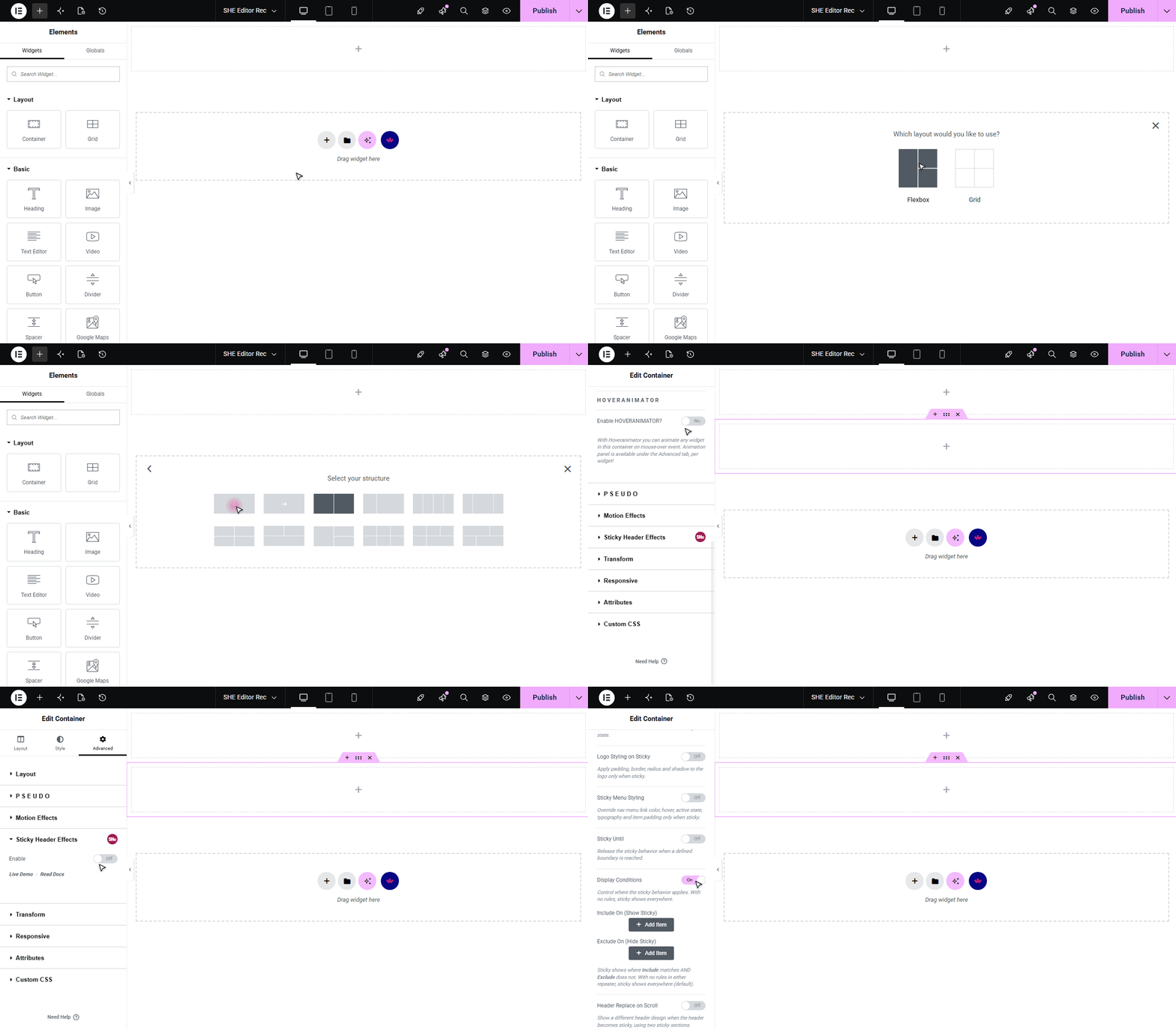
To do this, add the Elementor Container widget, then design the header content as per your requirements or use a header template and follow the steps –
1. Select the main Container widget of the header, then go to the Advanced > Sticky Header Effects tab and turn on the Enable toggle.
2. Turn on the Display Conditions toggle.
3. Under Include On (Show Sticky), add a rule and pick a Rule Type, then fill in the matching option. Available rule types are:
- Entire Site
- Front Page
- Posts Page (Blog)
- 404 Page
- Search Results
- Specific Post / Page
- Post Type
- Taxonomy Archive
- Specific Term
- Any Archive
- Author Archive
- User Logged In
- User Logged Out
- User Role
- URL Contains
4. Optionally, under Exclude On (Hide Sticky), add rules for the places where the sticky header should not appear.
5. The sticky header shows where an Include rule matches and no Exclude rule matches. With no rules in either list, the sticky shows everywhere (the default).
This lets you reuse a single sticky header across your whole site while fine-tuning exactly where it appears – no separate templates or conditions needed.

More in Display Conditions
Still stuck?
Ask in the community — real answers from the team and other builders.