
How to Add Multiple Sticky Sections on One Page in Elementor?
Do you want more than one sticky section on the same Elementor page, for example an announcement bar sitting above a main navigation? With the Multi-Sticky Coordination feature in Sticky Header Effects for Elementor, several sticky sections work together instead of fighting for the same spot at the top of the screen. They either stack neatly below one another or swap one at a time as the visitor scrolls.
To check the complete feature overview documentation of Sticky Header Effects for the Elementor plugin, click here.
Requirement. This feature is part of Sticky Header Effects for Elementor PRO, so make sure both the Free and Pro plugins are installed and activated.
What It Does
Multi-Sticky Coordination lets multiple sticky sections share the top of one Elementor page without overlapping. Normally, when two or more sections are set to stick, they all pin to the same position and cover each other. This feature turns that group into a coordinated set. You pick a behavior for the group, either Stack or Sequential, and set an order for each section, and the sections then pin in a predictable, tidy sequence as the visitor scrolls.
In Stack mode, every enabled section stays visible and pins one below the next, so an announcement bar can rest above a sticky navigation bar. In Sequential mode, only one section is shown at a time, and each one hands the top spot to the next as the visitor scrolls further down the page.
Why It Matters
A single sticky header is simple, but real pages often need more than one persistent element. An announcement bar, a primary navigation, a secondary utility bar, or a promotional strip may all need to stay reachable while the visitor scrolls. Without coordination, these sections collide, hide each other, or jump around, which looks broken and hurts trust.
Multi-Sticky Coordination solves that layout problem for you, so you do not have to write custom JavaScript or fight with CSS positioning. It keeps every important section in the right place, gives you control over the order, and keeps the page looking intentional on desktop, tablet, and mobile.
What You Get
Enabling Multi-Sticky Coordination on your sections gives you a small, focused set of controls inside the Sticky Header Effects panel:
- Multi-Sticky Coordination toggle to opt a section into the coordinated group.
- Behavior to choose Stack (all sections visible) or Sequential (one section at a time).
- Order / Priority to control which section pins first and which follow.
- Set Activation Point Manually to override automatic timing when a page has unpredictable content above the header.
- Activation Scroll Distance to set the exact scroll point, per device, at which a section takes over.
Benefits
- No overlap. Sticky sections line up instead of covering one another.
- Full control of order. You decide the exact sequence with a simple priority number.
- Two proven layouts. Stack and Sequential cover the most common multi-header needs.
- No code required. Everything is set from the Elementor panel, with no custom scripts.
- Responsive by default. The coordination recalculates on resize and works across breakpoints.
- Reliable timing. The feature re-measures positions as the page loads, so lazy images and fonts do not throw off when a section pins.
Capabilities
Multi-Sticky Coordination works on both Elementor Sections and Containers, and it coordinates up to five sticky sections on a single page. It runs on plain scroll control rather than native sticky positioning, which keeps it stable inside Elementor and Theme Builder layouts. The activation point can be measured automatically or set by hand as a fixed pixel distance, and that manual distance can differ for desktop, tablet, and mobile. The feature also keeps re-measuring on scroll, resize, and page load, so a section that pinned too early can correct itself once the layout settles.
Up to 5 sticky sections per page are supported. If more are enabled, only the first 5 by Priority order will coordinate, and the rest are ignored.
How It Works
When the page loads, the coordinator finds every section that has Multi-Sticky Coordination enabled and sorts them by their Order / Priority number. The section with the lowest priority number sets the behavior, either Stack or Sequential, for the whole group, so all coordinated sections follow one consistent pattern.
As the visitor scrolls, each section is measured against the current scroll position. In Stack mode, a section pins to the cumulative bottom of the sections already stacked above it, so they build up into a neat column at the top. In Sequential mode, only the most recently reached section stays fixed while earlier ones are hidden and later ones remain in normal flow. The feature keeps re-measuring on scroll, resize, and load, which is how a section that activated too early releases itself once the content above it finishes loading.
How to Use It
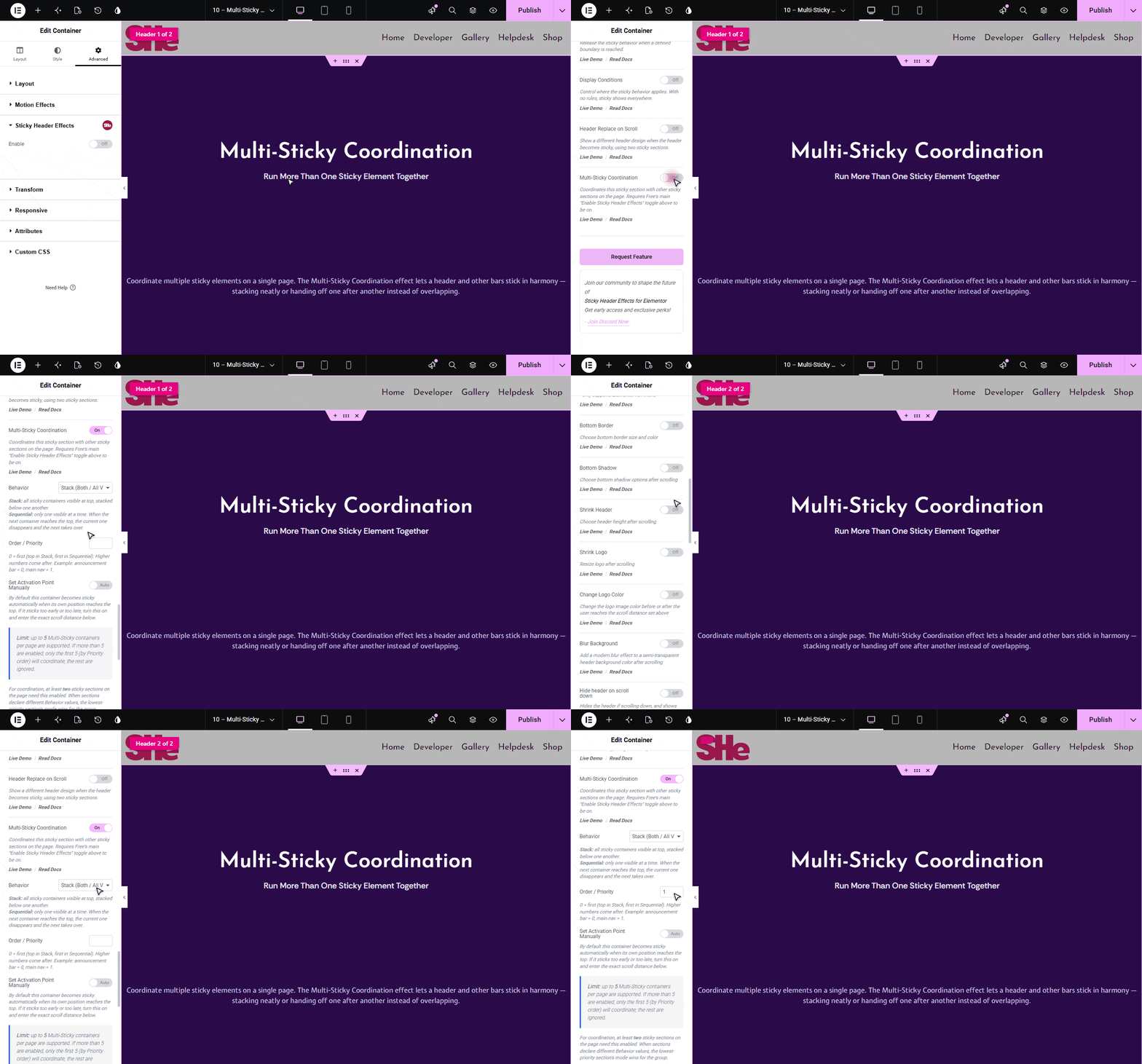
Multi-Sticky needs at least two sticky sections on the page with this feature enabled. Set it up on each section and follow the steps below.
- On each sticky section or Container, open the Advanced tab, go to the Sticky Header Effects section, and turn on the Enable toggle.
- Turn on the Multi-Sticky Coordination toggle on each section you want to coordinate (at least two).
- Choose a Behavior. Pick Stack so all sticky sections stay visible and stack below one another, or Sequential so only one shows at a time and each hands the top spot to the next.
- Set the Order / Priority for each section. 0 comes first (top in Stack, first in Sequential), and higher numbers come after. For example, announcement bar = 0, main nav = 1.
- If a section pins too early or too late, turn on Set Activation Point Manually and set the Activation Scroll Distance (px). The section takes over once the page has scrolled that many pixels (default 600px), and you can set a different value per device.
When sections declare different Behavior values, the lowest priority section sets the mode for the whole group, so keep the behavior consistent across your coordinated sections.
Use Cases
- Announcement bar over navigation. Keep a promo or notice bar at the very top with your main menu stacked right below it, both always visible in Stack mode.
- Compact scroll experience. Use Sequential mode so a tall hero header hands off to a slim navigation bar as the visitor moves down the page, saving vertical space.
- Utility plus primary nav. Pin a small utility bar (contact or language links) above the primary navigation for reference-heavy sites.
- Campaign landing pages. Combine a countdown or offer strip with a call to action bar so both stay in view while visitors scroll product details.
Limitations
- This is a Pro feature. Both the Free and Pro plugins must be installed and active for coordination to run.
- Free’s main Enable toggle must be on for each section, because Multi-Sticky Coordination is a sub-feature of the Sticky Header Effects panel.
- Coordination needs at least two sticky sections with the feature enabled on the same page.
- A maximum of five sticky sections coordinate per page. Any beyond the first five (by priority) are ignored.
- All coordinated sections share one behavior, which is set by the lowest priority section, so Stack and Sequential cannot be mixed within the same group.
Troubleshooting
The sections are not coordinating at all.
This usually means a prerequisite is missing. Confirm the Pro plugin is installed and active alongside Free, that Free’s main Enable toggle is on for each section, and that the Multi-Sticky Coordination toggle is enabled on at least two sticky sections on the same page. Coordination only starts once two or more enabled sections are present.
A section sticks too early, before it reaches the top.
This can happen when content above the header (for example lazy-loaded images or late-loading fonts) shifts the layout after the first measurement. Make sure the Pro plugin is active and updated, since the coordinator re-measures positions as the page settles and releases a section that pinned too soon. If the timing still looks off on a particular page, turn on Set Activation Point Manually and enter an exact Activation Scroll Distance, which bypasses automatic measurement entirely.
Only some of my sections pin, and the rest are ignored.
Coordination is capped at five sticky sections per page. If you have enabled more than five, only the first five by Order / Priority take part and the others stay in normal flow. Reduce the number of coordinated sections to five or fewer, and use the priority numbers to make sure the sections you care about are within that limit.
Another sticky header disappears when Multi-Sticky is active.
The Header Replace feature uses a broad catch-all rule that can hide other sticky headers on the same page, which conflicts with Multi-Sticky Coordination. Avoid enabling Header Replace and Multi-Sticky on the same page. Choose one approach per page so the two features do not compete for the same sticky sections.
The wrong section pins first, or they stack in the wrong order.
The order is driven entirely by the Order / Priority number, where 0 pins first and higher numbers follow. If the sequence looks wrong, review the priority value on each section and confirm the lowest number is the section you want at the top. Remember that this lowest priority section also sets the Behavior (Stack or Sequential) for the whole group.

More in Multi-Sticky
Still stuck?
Ask in the community — real answers from the team and other builders.